Human approvals
Hold risky tool calls for a person, decide them from the CLI, MAQPNA Desk or the console, and set up four-eyes approval, approver groups and user approval (CIBA).
flowchart LR
  A[Agent calls a tool] --> B{Rule action}
  B -- require_approval --> C[Gateway holds the call<br/>approval pending]
  C --> D[Approver reviews it<br/>CLI, MAQPNA Desk or console]
  D -- approve --> E[That one call runs]
  D -- deny with a note --> F[Agent gets -32001<br/>reason approval_denied]
  C -- no decision in time --> G[Approval expires<br/>call denied]
  E --> H[Audit ledger]
  F --> H
  G --> H
Goal#
Make a person decide before an agent runs a destructive or high-impact tool call, and record who decided. You will hold a call, deny it with a reason from the CLI, approve one from MAQPNA Desk, and learn how four-eyes approval, approver groups and user approval work in production.
An approval is a tool call that a rule held for a human decision. It is pending, then approved, denied or expired. Approving lets exactly that one call run, once.
Prerequisites#
- A local MAQPNA:
maqpna dev up(see Your first governed agent). Its built-in policy has the ruledestructive-needs-human, which holdsdelete_*,drop_*,destroy_*,terminate_*,scale_*,merge_*anddeploy_*. - Two terminals.
- In a cluster: the
approverrole for the namespace (see Who may approve).
Steps#
1. Write an approval rule#
A rule with action: require_approval holds matching calls. The reason is shown to the approver and the
agent:
  rules:
  - name: destructive-needs-human
    tools: ["delete_*", "drop_*", "destroy_*", "terminate_*", "scale_*", "merge_*", "deploy_*"]
    action: require_approval
    reason: destructive or high-impact operation
    maxCallsPerMinute: 10
Test it before you load it (see Write and test policies):
maqpna policy test --policy policy.yaml --ns dev --agent coder --server echo --tool delete_resource \
  --expect require_approval
2. Make a call that is held#
In the first terminal, call delete_resource. The call waits for a decision:
maqpna dev run -- maqpna call --server echo --tool delete_resource --arg id=db-1 --arg namespace=dev
maqpna dev: session dev-f19c3be3 (agent coder, namespace dev, on behalf of you@localhost)
The local gateway expires a pending approval after 5 minutes (approvalTimeoutSeconds: 300 in
.maqpna/gateway.json). maqpna call waits a little longer (--timeout, default 5m30s).
3. Review it#
In the second terminal, load the local admin token and list pending approvals:
eval "$(maqpna dev env)"
maqpna approvals list
ID                           STATUS    NAMESPACE      AGENT          TOOL                     REASON
apr_77c929b95a8a6cf4b6cb63f8 pending   dev            coder          echo/delete_resource     destructive or high-impact operation
maqpna approvals get ID shows everything an approver needs: the session, the user the agent acts for,
the policy rule, an argument preview, the hashes of the arguments and of the tool definition, and the
expiry:
ID:                 apr_902e3a670541349ffc7844a3
Status:             pending
Namespace:          dev
Agent:              coder
Session:            dev-9d49283c
User:               you@localhost
Tool:               delete_resource
Server:             echo
Rule:               destructive-needs-human
Reason:             destructive or high-impact operation
Args preview:       {"id":"db-1","namespace":"dev"}
Args SHA-256:       eb7b969d77013fd421c56dcfa2e86f0b95ebe1930d1c96063b0ceb562bfddcd8
Tool def SHA-256:   sha256:69e35d14f2c8c5a052a79fd54f0df65647f780f52817727d69cfc226c5acbf9e
Created:            2026-10-02T23:41:29.022664-04:00
Expires:            2026-10-02T23:46:29.022664-04:00
Required approvals: 1
You can decide:     true
To wait for new approvals in a script, use maqpna approvals watch --exit-on-first.
4. Deny it with a reason#
maqpna approvals deny apr_77c929b95a8a6cf4b6cb63f8 --approver reviewer@localhost \
  --note "db-1 is shared; open a change ticket"
apr_77c929b95a8a6cf4b6cb63f8: denied (by reviewer@localhost)
The held call in the first terminal returns at once, with exit status 3:
error -32001: denied by policy default-agent-policy rule destructive-needs-human: approval_denied by reviewer@localhost (apr_77c929b95a8a6cf4b6cb63f8)
data: {"detail":"approval_denied by reviewer@localhost (apr_77c929b95a8a6cf4b6cb63f8)","domain":"maqpna.com","policy":"default-agent-policy","reason":"approval_denied","rule":"destructive-needs-human"}
To approve instead:
maqpna approvals approve ID --approver reviewer@localhost --note "test resource"
With a static admin token, --approver names the approver (default: your OS user name). With an OIDC
token, the gateway takes the approver from the token and ignores --approver.
5. Decide from MAQPNA Desk#
MAQPNA Desk is the desktop app for approvers. maqpna desk serves the same page on 127.0.0.1 and opens it
in your browser; the native apps for macOS, Windows and Linux wrap it in a window with a tray icon and
notifications.
maqpna desk
With a local MAQPNA running, Desk uses its gateway and admin token. Otherwise it uses --gateway,
$MAQPNA_GATEWAY_URL or the current context, and without any of them it port-forwards to the gateway
Service of your kube context.
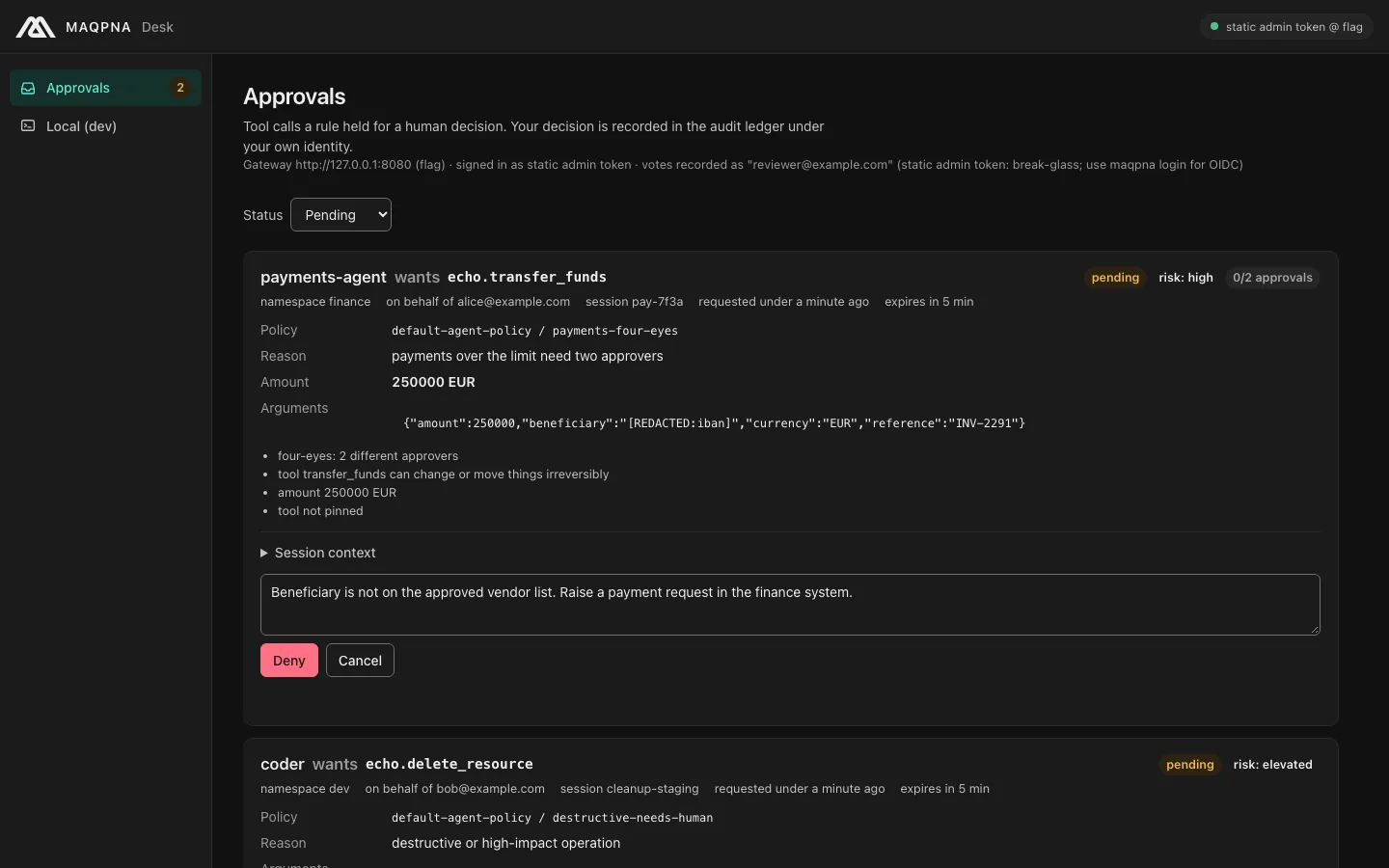
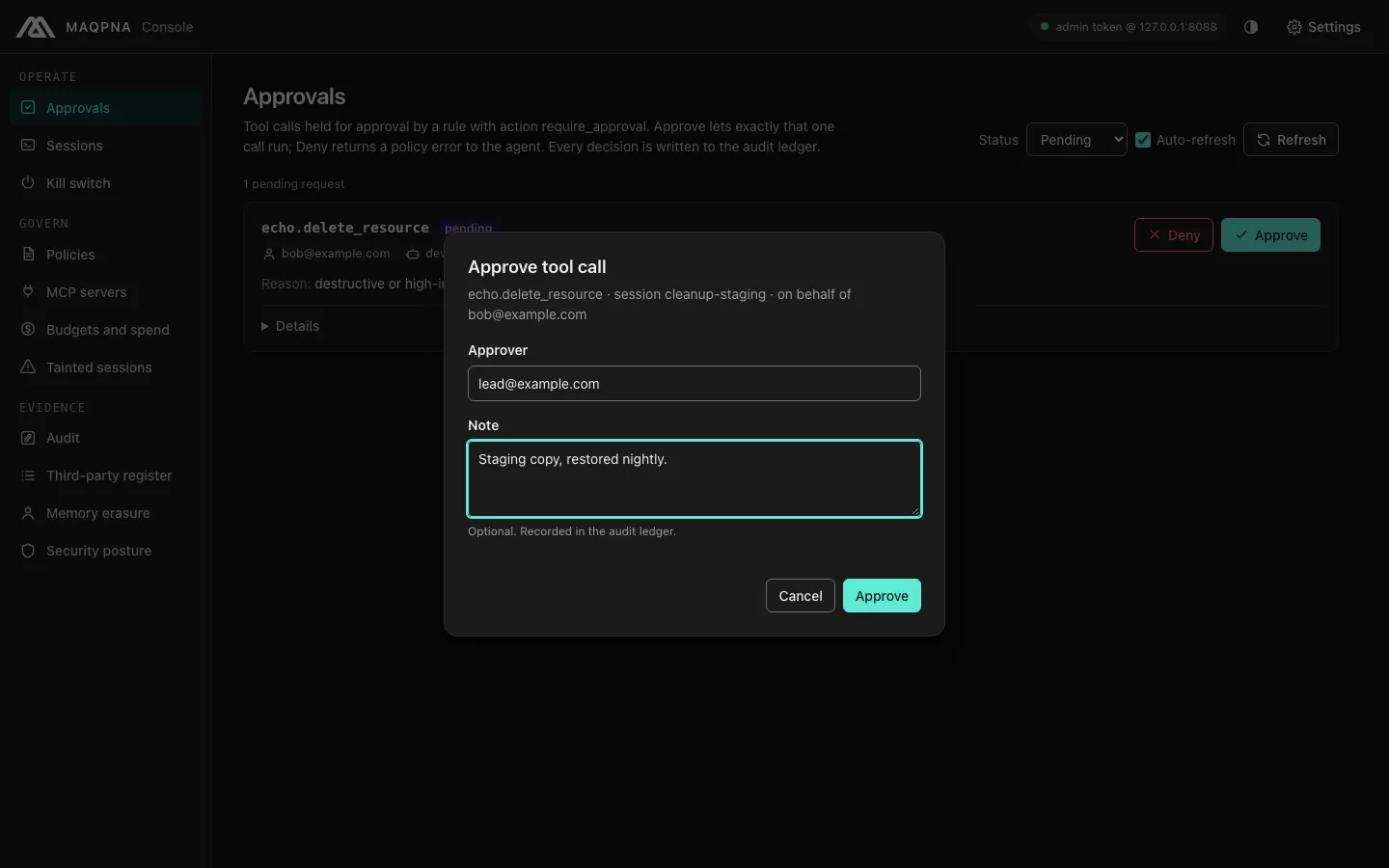
For each pending approval, the inbox shows what the agent wants to do (agent, tool, namespace, user, session, argument preview), which policy rule held it, a risk summary and the last ten steps of the session.
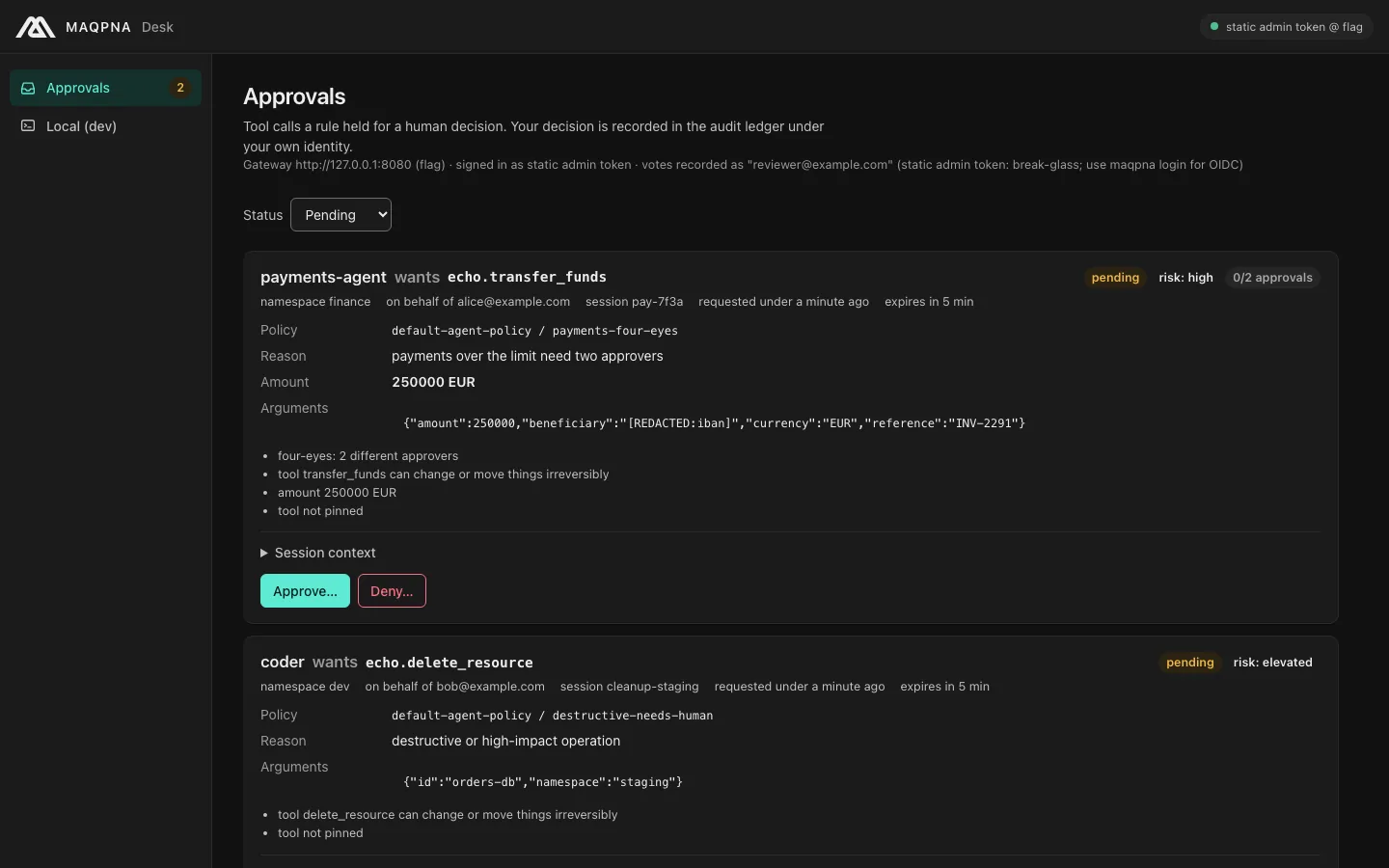
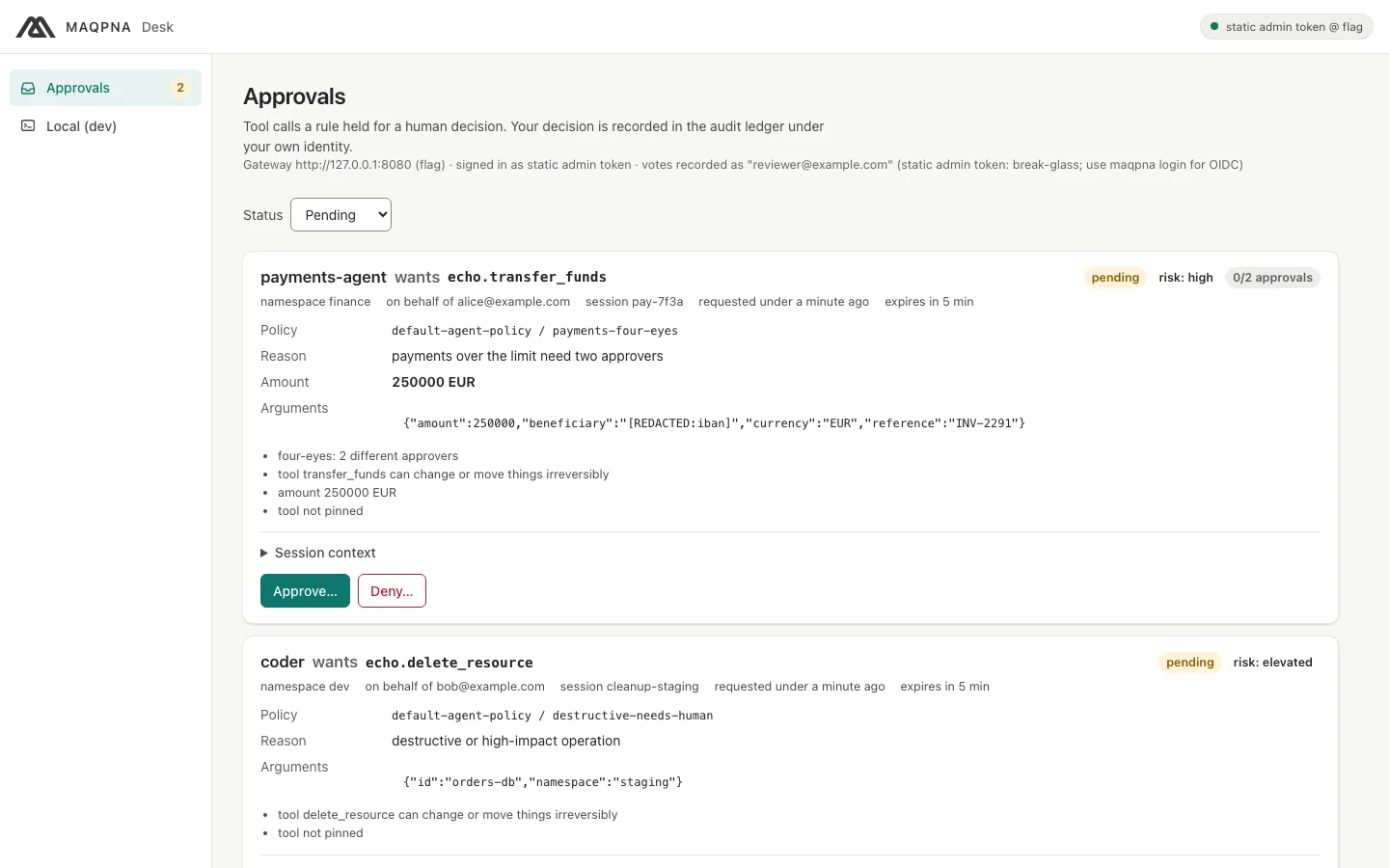
Approving takes two clicks: Approve…, then Approve. Denying needs a reason:
Desk adds no credentials and no privileges. It calls the same admin API as maqpna approvals, so every
approver check below applies. Before a vote it re-reads the approval and refuses the vote if the approval
is no longer pending or its arguments changed.
6. Decide from the console#
The console has the same inbox for teams that work in a browser:
maqpna console --open                                  # in a cluster: port-forwards to the gateway
maqpna console --gateway http://127.0.0.1:8080 --open  # a local MAQPNA
Sign in with an access token from your identity provider. In development or a break-glass case, the
gateway's static admin token also works (maqpna dev env prints the local one).
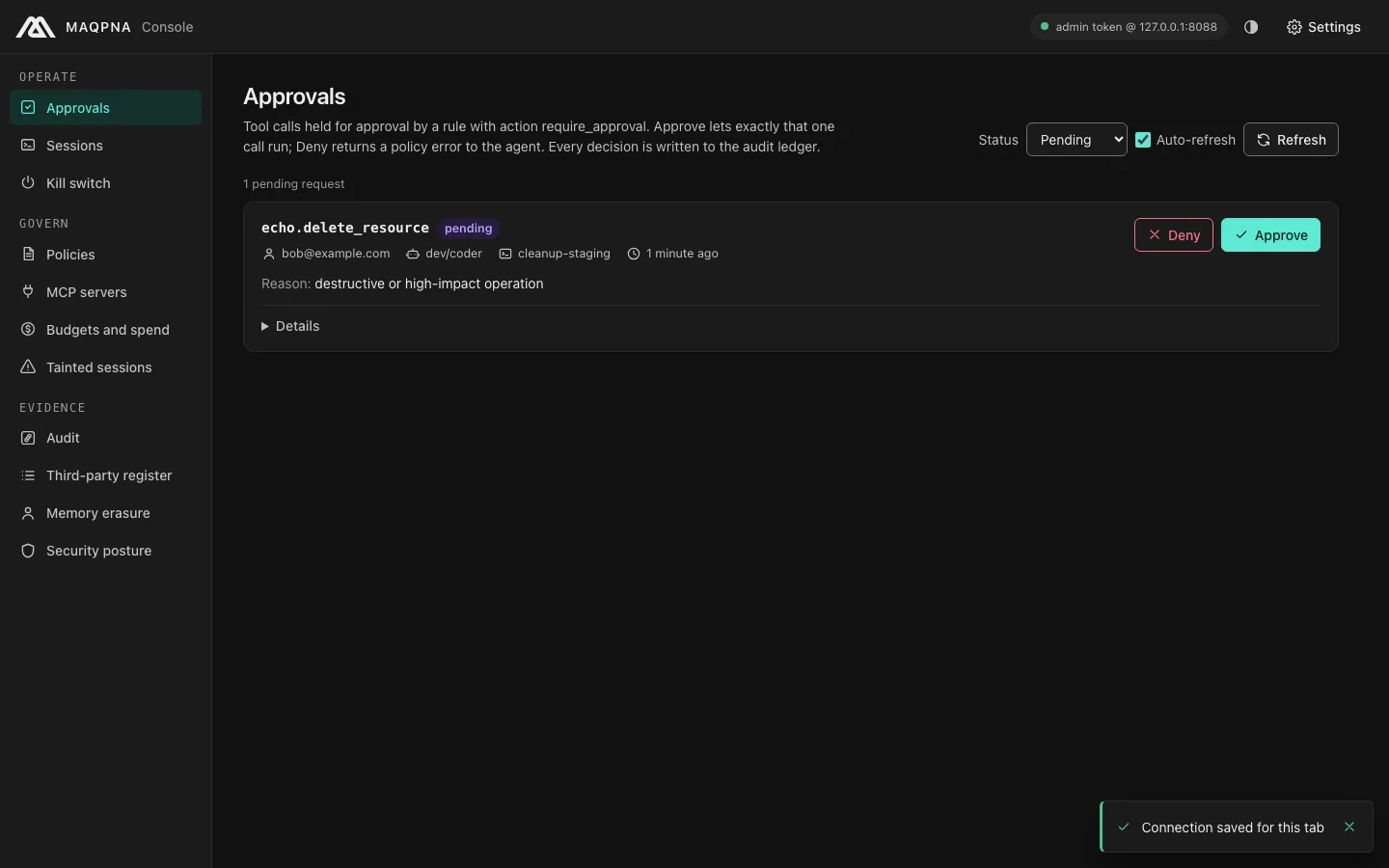
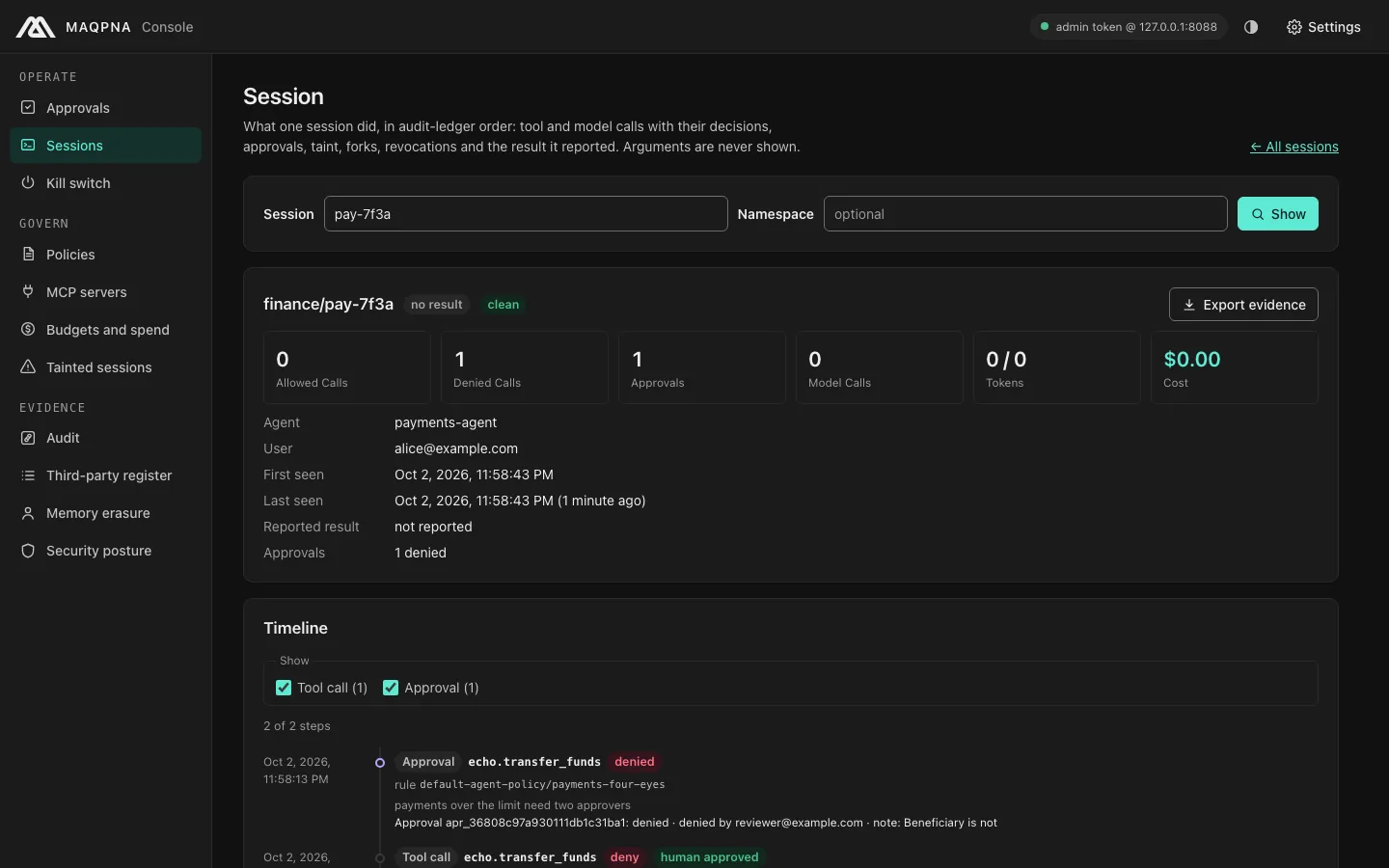
The session timeline shows the decision and the note:
7. Use async mode in an agent#
By default a held call blocks until a person decides. An agent that should keep working sends the header
X-Maqpna-Async: 1. The gateway then answers at once with JSON-RPC -32002 and the approval ID:
maqpna dev run --agent ops --session ops-1 -- maqpna call --server echo --tool delete_resource \
  --arg id=db-1 --arg namespace=dev --header X-Maqpna-Async:1
error -32002: approval required (destructive or high-impact operation); retry with header X-Maqpna-Approval-Id once approved
data: {"approvalId":"apr_c40146f4e24621f834df7cdb","detail":"destructive or high-impact operation","domain":"maqpna.com","expiresAt":"2026-10-02T23:59:30.373302-04:00","policy":"default-agent-policy","reason":"approval_required","rule":"destructive-needs-human"}
After an approver approves it, retry the same call with X-Maqpna-Approval-Id:
maqpna dev run --agent ops --session ops-1 -- maqpna call --server echo --tool delete_resource \
  --arg id=db-1 --arg namespace=dev --header X-Maqpna-Approval-Id:apr_c40146f4e24621f834df7cdb
"text": "deleted resource db-1 in namespace dev (simulated)",
An approval is used once. A second retry with the same ID is denied with
approval_invalid: approval: already used. The SDKs do this for you: async mode raises ApprovalPending
with the approval ID (see the Python SDK and framework adapters).
Who may approve#
The gateway's admin API authenticates every decision. Configure it with the Helm values adminAuth:
adminAuth.mode |
Approver identity |
|---|---|
token |
The static admin token. The approver name is whatever the request says (--approver). For development and air-gapped bootstrap only. |
oidc |
An access token from your identity provider. The approver is taken from the verified token (usernameClaim, default preferred_username, then email, then sub). |
both |
OIDC, plus the static token as a break-glass credential. Every use is logged. |
Roles map identity-provider groups to permissions. approver decides approvals; viewer, auditor,
admin and killswitch are the others:
adminAuth:
  mode: oidc
  oidc:
    issuer: https://idp.example.eu/realms/maqpna
    audience: maqpna-admin
    clientID: maqpna-console
  roles:
    approver: ["maqpna-approvers"]
    admin: ["maqpna-admins"]
    killswitch: ["maqpna-sre"]
  namespaceRoles:
    team-a: {approver: [team-a-leads]}
Separation of duties is always enforced. The user the session acts for, and the agent itself, can never
approve its calls: the gateway answers HTTP 409 self_approval.
Four-eyes approval and approver groups#
Set approval.minApprovers on a rule to require several distinct approvers, and approverGroups to
require each of them to be in one of those groups:
  - name: payment-instructions-four-eyes
    tools: [submit_payment_instruction]
    action: require_approval
    reason: payment instructions need two approvers
    approval: {minApprovers: 2, approverGroups: [treasury-supervisors]}
The first approval leaves the request pending:
apr_b907112dfc44199703f0fe98: pending (1 of 2 approvals; by <nil>)
approvals get then shows Required approvals: 2 and Approved by: alice@bank.example. One deny is final.
You can also set four-eyes outside the policy with the Helm value approvals.quorum, as a default or per
"<policy>/<rule>".
User approval (CIBA)#
Some calls should be confirmed by the person the agent acts for, on their own device, rather than by an
approver. Set userConfirmation: ciba on the rule:
    action: require_approval
    approval: {userConfirmation: ciba}
The gateway then asks your identity provider to confirm with the user (OpenID CIBA). Only that user's own
confirmation can approve; an approver's approve is refused. Configure it with the Helm values
delegation.ciba (enabled, issuer, clientID, clientSecretFile, userClaim, scopes,
acrValues, requestedExpirySeconds). fallback: approvers (the default) lets approvers decide when CIBA
is unavailable; fallback: deny denies the call instead. Add the identity provider to
sovereignty.allowedEgressHosts.
Notifications#
The gateway can notify a webhook, Slack, Microsoft Teams or Matrix when a call is held. Set the Helm values
approvals.notifiers, approvals.notifierSecret and approvals.consoleURL (the link in the
notification). approvals.preview.mode sets what approvers see of the arguments: none, hash,
redacted (the default; obvious secrets masked) or full.
Verify#
maqpna approvals list --status all          # every approval and its final state
maqpna dev timeline --last                  # the approval and the decision on the call
TIME      KIND       SERVER/TOOL           DECISION          DETAIL
00:00:52  approval   echo/delete_resource  require_approval  apr_77c929b95a8a6cf4b6cb63f8 denied
00:01:09  tool_call  echo/delete_resource  deny              approval_denied by reviewer@localhost (apr_77c929b95a8a6cf4b6cb63f8)
In a cluster, maqpna audit tail --decision deny shows denied calls with the approver.
Troubleshooting#
| Symptom | Cause | Fix |
|---|---|---|
HTTP 409: self_approval |
You are the user the session acts for, or the agent | Ask another approver |
HTTP 409: duplicate_approver |
You already approved, or a second vote used the same static token | Use a second person's OIDC credential |
HTTP 403 on approvals list or a decision |
Your token has no approver or admin role for the namespace |
Run maqpna whoami; ask an admin to map your group in adminAuth.roles or namespaceRoles |
The agent gets approval_expired or the call times out |
Nobody decided before the approval expired | Decide sooner, use async mode, or raise the gateway's approvalTimeoutSeconds |
approval_invalid: approval: already used |
An approval ID was retried twice | Request a new approval |
| The approval is pending after one approve | The rule needs minApprovers: 2 |
A second approver decides |
Desk or the console labels a denied call approved_by_human |
A known labelling issue in the gateway timeline: a record with an approver is labelled human-approved even when the approver denied it | Read the decision column (deny) and maqpna approvals get ID, which are correct |
maqpna approvals list -n team-a or approvals watch -n team-a fails with unknown flag -n |
The approvals commands have no namespace filter | Filter the JSON: maqpna approvals list -o json --jq '.approvals[] \| select(.namespace=="team-a") \| .id' |
Next steps#
- Write the rules that hold calls: Write and test policies.
- Stop an agent at once instead of reviewing calls: Kill switch and revocations.
- Read and verify the decisions later: Audit ledger.
- Handle
-32002and-32001in code: Error and reason codes. - Command reference:
maqpna approvals,maqpna desk,maqpna console.