Sessions
Start, list, inspect, control and delete sessions, read their timeline, logs, events and cost, and run commands in a session's sandbox.
flowchart LR
  S[maqpna session start] --> P[Pending → Provisioning]
  P --> R[Running]
  R -->|suspend| U[Suspended]
  U -->|resume| R
  R -->|fork / snapshot| F[Child sessions<br/>snapshots]
  R --> C[Completed or Failed<br/>with a result]
  R -.-> T[timeline · logs · events · cost]
  R -->|delete --terminate-now| X[Revoked and deleted]
Goal#
Work with sessions end to end: start one, follow it, see every governed call it made, pause and resume it, look inside its sandbox, and remove it.
A session is one run of an agent, from start to result, with its own sandbox, identity and session token. In a cluster it is an AgentSession object; on a laptop, maqpna dev run creates a local session without Kubernetes.
Prerequisites#
| Task | Needs |
|---|---|
| Timeline of a local session | A local MAQPNA (maqpna dev up) |
session cost |
A gateway and an access token (admin API) |
session start, list, get, describe, wait, suspend, resume, fork, snapshot, delete, logs, events |
A Kubernetes cluster with MAQPNA installed and a kubeconfig context with RBAC on agentsessions in the namespace |
session exec, files, liveview |
A cluster, plus the gateway session API: an access token with the admin role. They are governed and audited like any tool call (scope tools:maqpna-exec) |
Cluster commands default to the namespace default; pass -n NAMESPACE (or -A for list). Without a cluster they stop with:
✗ kubeconfig: invalid configuration: no configuration has been provided, try setting KUBERNETES_MASTER environment variable
  No Kubernetes cluster is configured. Set KUBECONFIG, or pass --kubeconfig FILE or --kube-context NAME.
  → kubectl config get-contexts
Steps#
1. See a local session's timeline#
Every maqpna dev run is one session. When the command exits, maqpna dev run prints a summary that points at the timeline:
maqpna dev up --stub-llm
maqpna dev run -- maqpna call --server echo --tool delete_resource --arg id=db-1 --arg namespace=kube-system
maqpna dev timeline --last
Output from a local run:
TIME      KIND       SERVER/TOOL           DECISION  DETAIL
23:41:09  tool_call  echo/delete_resource  deny      system namespaces are off-limits to agents
dev-0cf86530: 1 deny, cost $0.0000 (maqpna dev timeline --last)
A session with an approval shows the approval and the call it held:
TIME      KIND       SERVER/TOOL           DECISION          DETAIL
23:41:29  approval   echo/delete_resource  require_approval  apr_902e3a670541349ffc7844a3 denied
23:41:32  tool_call  echo/delete_resource  deny              approval_denied by reviewer@localhost (apr_902e3a670541349ffc7844a3)
dev-9d49283c: 1 deny, cost $0.0000 (maqpna dev timeline --last)
Pick a session with --session ID, and get the summary and items as JSON with -o json. The timeline is the ledger-ordered view of the session; the records behind it are in the audit ledger.
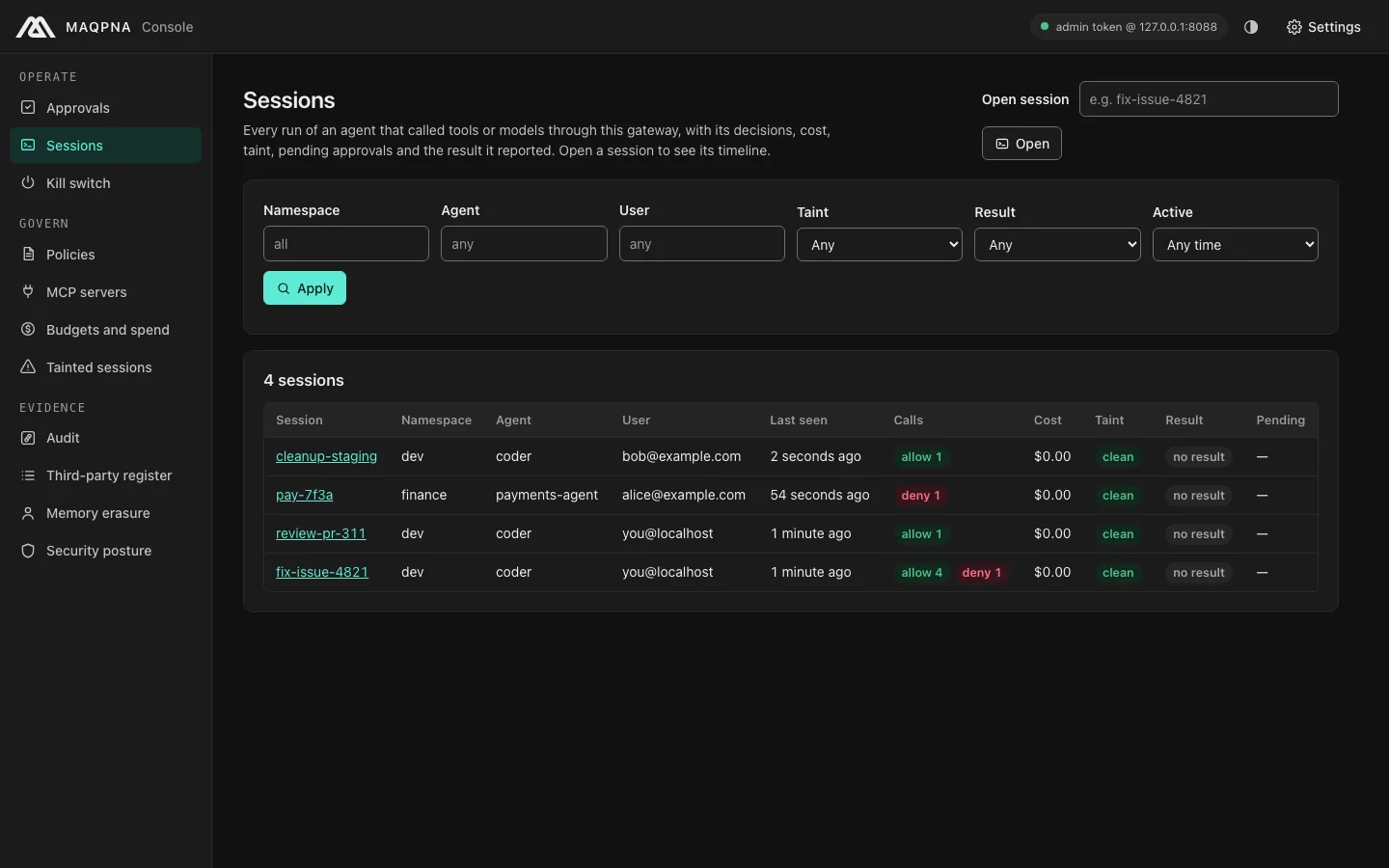
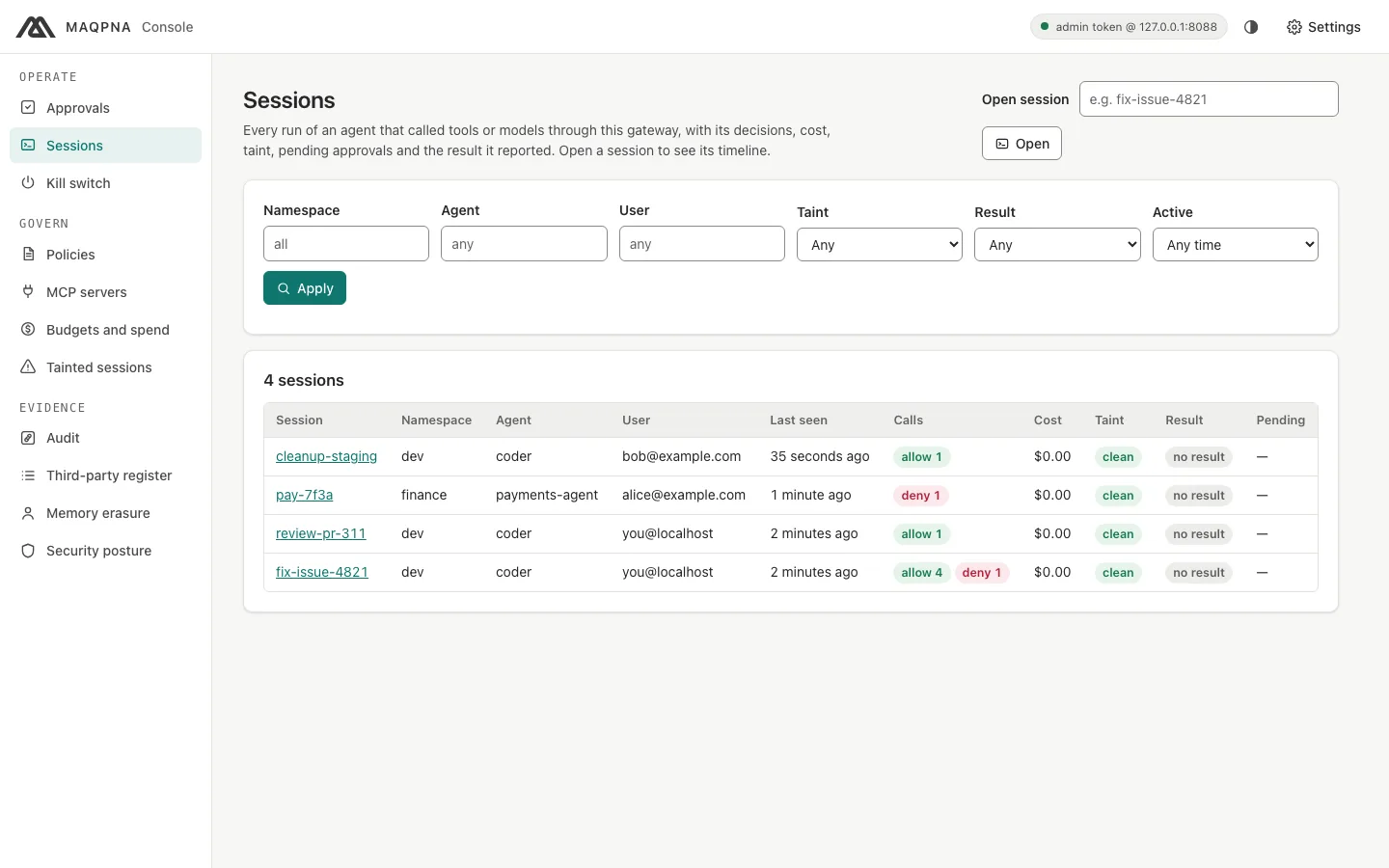
The console's Sessions page lists every session that made governed calls through the gateway, with its decisions, cost, taint, result and pending approvals; open one for its timeline.
2. Check a session's cost#
eval "$(maqpna dev env)"
maqpna session cost dev-ae793f67
Output from a local run (one model call through the scripted stub model):
session dev-ae793f67
  costUsd: 0
  firstSeen: 2026-10-02T23:47:22.856066-04:00
  inputTokens: 8
  lastSeen: 2026-10-02T23:47:22.856066-04:00
  modelCalls: 1
  outputTokens: 44
  sandboxCostUsd: 0
  sandboxSeconds: 0
  tokenCostUsd: 0
  toolCalls: 0
  toolCostUsd: 0
Totals per namespace, agent or user are in maqpna costs summary (see budgets and cost limits).
3. Start a session in a cluster#
Preview the AgentSession first. --dry-run prints it without creating it, so it runs without a cluster:
maqpna session start --agent coder -n team-a --user alice@example.com --task "fix the failing test" --name fix-test-7k2 --dry-run
apiVersion: maqpna.com/v1alpha1
kind: AgentSession
metadata:
  name: fix-test-7k2
  namespace: team-a
spec:
  agentRef: coder
  input:
    task: fix the failing test
  user: alice@example.com
status: {}
Then create it and wait until it runs:
maqpna session start --agent coder -n team-a --user alice@example.com --task "fix the failing test" --wait
Useful flags: --task-file F (or - for stdin), --scope and --group (repeatable), --env K=V, --ttl (clamped by the trust tier and the agent), --user-assertion-ref SECRET/KEY (an OIDC ID token of the user), and --attach to wait and then follow the agent's logs. Without --user the session acts for your Kubernetes user name. Without --name it is named <agent>-<random>.
The operator then creates the sandbox and the session token. Phases are Pending, Provisioning, Running, Suspended, Completed and Failed.
4. List and inspect sessions#
maqpna session list -n team-a
maqpna session list -A --phase Running --agent coder
maqpna session get fix-test-7k2 -n team-a
maqpna session describe fix-test-7k2 -n team-a
list prints the columns NAME, AGENT, USER, PHASE, OUTCOME, READY-IN and AGE (with NAMESPACE first for -A). describe merges the object's status and conditions, the sandbox and its pods, snapshots, the workload identity (SPIFFE ID), the user it acts for, the result, taint, cost and budget, and pending approvals from the gateway. Gateway errors are shown in the output, not treated as fatal.
5. Wait for a state#
maqpna session wait fix-test-7k2 -n team-a --for phase=Running --timeout 5m
maqpna session wait fix-test-7k2 -n team-a --for terminal
maqpna session wait fix-test-7k2 -n team-a --for condition=Ready=True
wait exits 1 on timeout or when the session fails, so scripts can rely on the exit status.
6. Follow logs and events#
maqpna logs fix-test-7k2 -n team-a -f
maqpna logs fix-test-7k2 -n team-a -c agent --since 10m --timestamps
maqpna events fix-test-7k2 -n team-a -w --types Warning
logs reads the pods labelled maqpna.com/session; -c picks a container (agent, exec, browser, attest). events shows events for the session, its sandbox or claim, its pods and its snapshots.
7. Suspend, resume, snapshot and fork#
maqpna session suspend fix-test-7k2 -n team-a --wait
maqpna session resume fix-test-7k2 -n team-a --wait
maqpna session snapshot fix-test-7k2 -n team-a --name fix-test-7k2-snap --wait
maqpna session fork fix-test-7k2 -n team-a --count 3 --from-snapshot fix-test-7k2-snap --wait
suspend and resume patch spec.suspend. A snapshot (AgentSessionSnapshot) uses --strategy Auto, SandboxSnapshot or VolumeSnapshot. A fork copies the agent, user, groups and scopes of the source; with --count N the children are named NAME-1 to NAME-N.
8. Look inside the sandbox#
maqpna session exec fix-test-7k2 -n team-a -- ls /workspace
maqpna session exec fix-test-7k2 -n team-a --code 'print(1 + 1)'
maqpna session files fix-test-7k2 -n team-a
maqpna session files fix-test-7k2 report.md -n team-a --out ./report.md
maqpna session liveview fix-test-7k2 -n team-a --open
exec streams stdout and stderr and exits with the remote exit code. --language picks the interpreter (default sh for a command, python for --code or --file). liveview opens the live view of a browser sandbox (needs gateway.liveView.enabled).
9. Delete a session#
maqpna session delete fix-test-7k2 -n team-a --yes
To stop a running session at once, revoke it at the gateway before deleting it. --terminate-now writes a break-glass terminate revocation (lifetime --revocation-ttl, default 1 h), then deletes:
maqpna session delete fix-test-7k2 -n team-a --terminate-now --reason "INC-2041: runaway loop" --wait --yes
On a terminal delete asks for confirmation; without a terminal it needs --yes and exits 2 otherwise. See kill switch and revocations to stop every session of an agent or user.
Verify#
maqpna dev timeline --lastlists the calls of your last local session with their decisions.- In a cluster,
maqpna session wait S -n NS --for terminalexits 0 andmaqpna session get S -n NSshowsCompleted. - After
delete --wait,maqpna session get S -n NSreports that the session is not found.
Troubleshooting#
| Symptom | Cause | Fix |
|---|---|---|
No Kubernetes cluster is configured |
Cluster command without a kubeconfig | Set KUBECONFIG or a context with maqpna context set, or use maqpna dev locally |
timeline: HTTP 404 {"error":"session not found"} |
The session made no governed call, or the ID is wrong | Run maqpna audit tail --since 0 to find session IDs |
Session stays Pending |
No warm-pool or node capacity, missing RuntimeClass for its trust tier, or a sovereignty violation | maqpna events S -n NS --types Warning and maqpna session describe S -n NS |
session exec returns HTTP 403 |
Your token has no admin role, or gateway.exec.enabled is off |
maqpna whoami; enable exec in the chart |
delete exits 2 in a script |
No terminal and no --yes |
Add --yes |
Next steps#
- Audit ledger and evidence: export a session's records as an evidence bundle.
- Human approvals: decide the calls a session is waiting on.
- Taint and prompt-injection containment: what
describeshows as taint. - Command reference:
maqpna session start,maqpna session describe,maqpna dev timeline,maqpna logs,maqpna events.